Anxiety, depression, peer pressure, mood disorders, uneasiness, etc. are the biggest enemies of humans these days. And agree or not these are the direct by-products of changing lifestyles and complex minds that are unequipped to handle the duality of human existence. How to control this horribly argumentative mind? Is there any psychological or physiological manifestation? Is there any instrument that can help us evolve in today’s era where almost everyone has their toes dipped in the dopamine of digitalization? Thankfully yes! Meditation with the wings of technology— also known as On-Demand Meditation App; they have been a pivotal instrument to help an individual achieve mindfulness and peace through mental training practices. These apps are enormously helping people in large to practice self-regulation and self-consciousness through mental exercises such as deep breathing, relaxation, guided imagery and visualization, and more. The unhealthy lifestyle and enhanced anxiety levels have increased the usage of meditation apps even more after the world got hit with COVID-19. The market of meditation apps is anticipated to outpace a market value of US$ 180 Mn by the end of 2032, witnessing a CAGR of 8.4% through 2022-2032.
Market Growth Figures of Meditation App

Image Source: Statista
The above stats showing leading health & meditation apps depicts the leading market players in the meditation app space who are doing exceptionally well and earning a good percentage of revenue. The calm app is at the top in terms of revenue generation which has supported society in providing a stress-free and healthy life. In addition to this, the user penetration of meditation app is expected to be 7.48% in 2022 and is expected to hit 11.23% by 2025. So, the above figures indicate the massive growth opportunities from both user and market perspectives and considering that you must think of investing in a similar field. In this post, we will be discussing all the essential aspects of meditation app development. There are already a few ruling meditation apps in the market like calm, headspace, shine, inside timer, etc. that can help you pull inspiration and business model. We have tried to envelope all those features as well. Consider reading this full guide and find a way ahead to bring a radical up-gradation in the meditation app development market and reach the peak to meet your business goals.
Steps To Follow While Creating A Meditation App
To ensure that you are making the right moves in your app development lifecycle, you need to include some of the essential elements in your app development process:
1. Bring Clarity Of The Business Idea
It’s always good to explore things before you actually begin. So, while you are already planning to invest in meditation apps, make sure you have a thorough idea about its basic concept and all the categories that are available in the market. Consider the different options like weight loss meditation apps, walking meditation apps, mental health tracker app, yoga apps, breathing meditation apps, morning meditation apps, guided meditation apps, and so on.
2. Choose The Right Product Platform
“When you keep your feet on the right street, your foundation becomes more concrete”. Said that, to make a concrete start conduct a deep study on the product platforms available for you i.e. both iOS and Android. The things you need to consider while choosing the platform are your target audience, user preferences, location, income, education, and so on. The choice of the platform is also necessary as it directly affects the overall costing of the app development project.
3. Upgrade Your Limits Using AR/VR Technology
Give your users near to real experiences with virtual lenses. The AR/VR technology is doing a remarkably great job in making it easy for the users to experience the best relaxing sessions; which are integrated with the meditation apps. This AR/VR-based UI will increase user engagement and encourage them to practice regularly. Thus, increasing your client retention rate.
4. Make Use Of The MVP Models
It’s always good to taste a piece before buying the whole cube. The MVP model works on the same concept. It is a kind of tester phase where a developer has the space to add or eliminate multiple features before moving on to the second phase. The developers are always advised to restrain from complex features like video streams, in-app payments, in-build chats, etc. in the MVP model initial phase. Rather they are tasked to focus on simple features to check the viability of the app with features like:
- User profile with Sign-in/Sign-out feature
- Initial introductory video
- Customer progress statistics
- Push-Notifications and other basic features
5. Select The Right Set Of UI/UX Approach
The key to success lies in what your customer gets to see. So, putting the right set of UI/UX approach is necessary. It assures you of a better ROI and helps in building your confidence. The things that need to be focused on deciding the UI/UX approach are the perfect combination of colors, prioritizing animations over fonts, and avoiding the cluttered and overloaded design patterns. Initially, you need to pay more attention to the above patterns because they can distract you from achieving your business goals on the first try only.
6. App Integration With Wearable Devices
The connections get stronger when things are closer. And adding meditation apps to wearable devices is reducing the distance between the user and technology. Users will feel more comfortable when doing meditation will be a super easy process for them. They will be able to get instant access to the processes using wearable devices like smartwatches, fitness trackers, etc.
7. Choose The Best Development Team
The right choice of the development team is what brings success to your meditation app. It is necessary that your development team must have in-depth knowledge about the features, functionalities and technologies that can make your app a superlative of all. Some of the essential features are explained here in detail:
Key Features of Meditation App Development
- Profile & Sign-In/Sign-Up ManagementInitially, just to ensure that your users don’t lose interest, make sure to provide an easy and quick sign-up process. Allow them to register using mobile numbers, social media handles, or email ids. Moreover, provide a good process for profile creation where it is easy for them to save and access their personal information and all the activities that they perform.
- Meditation Program ManagementThis is the core of your app. If you wish to stay ahead of the market competition then make sure that you are putting in a variety of options in your meditation programs library. Grab the user’s attention by regularly updating things and improvising on your basics or the app.
- Push NotificationsStay connected with the customers by keeping them updated about all the essential information. This feature is usually used to promote promotional offers, remind users about their meditation time or recommend multiple other meditation sessions.
- Play ButtonPlay button is a prerequisite to control the different types of meditation sessions and to make the process easier. To make it more attractive it is advisable to set the desired background to both photos and videos.
- Easy SearchIt is the responsibility of the development team to categorize the right set of content under the required labels so that users can find the content easily.
- Meditation LibraryThe user retention rate is likely to increase when people have multiple options to choose from. A meditation library will keep them engaged and develop a curiosity to try new sessions. Remember to list down the sessions in logical groups that make it easy for users to browse the library easily.
- Personal ProgressIt is always good to have a track record of what you do. Reviewing reports and experiencing progress with rewards and badges increases a person’s motivation and helps them in sticking to it.
- Payments OptionsThe payment stage is the most fragile one where the chances of losing customers are more if you fail to provide the payment option they use. So, integrate multiple payment options (i.e. credit/debit card, mwallet, and Apple Pay, Google Pay, or PayPal integration) only after understanding your target audience and their preferences.
Know the Business Model of Top 5 Meditation Apps
Before you jump into the meditation app development, take inspiration from the top meditation app leaders and plan your smart move to thrive in this industry.
Calm App
 This meditation app has the highest flexibility level. It is good for beginners, especially those who have less time. The app is less affected by the calming background sound and is really very easy to follow.
Insight Timer App
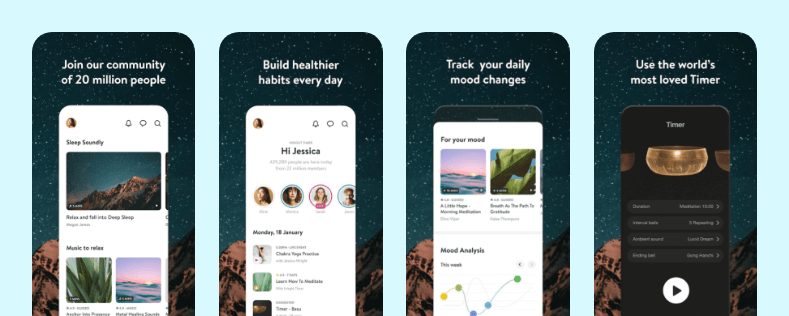 It is known for its giant library having 45000+ free meditations along with seven days intro course. This insight timer offers easy search and filter options and also access to a free community of meditators.
Headspace App
 The user-friendly interface of the Headspace app provides guided sessions for beginners and helps in coping with the external sounds from a bundle of pre-recorded meditations to choose from.
Shine App
 This app allows users to use features that are more than just meditation. It has the option to offer bedtime stories, self-care exercises, gratitude check-ins, etc. It also aids users with motivational text messages about life and positivity.
Ten Percent happier App
 People who are suffering from lack of sleep and heavy stress must use this app. This app enables users to connect with experts to ask relatable questions and provides more than 100 free meditations to learn.
How Much Does It Cost To Develop A Meditation App?
There is no fixed estimated cost for developing a meditation app. The app development cost entirely depends on its features, its platform, hourly development rate, the team structure, location of the development team, etc.
- App Platform – Do you want to develop the app on the iOS platform or Android or both? The cost varies platform wise.
- App Design – The user interface and user experience is the essence of any app that woo users’ attention and keep them glued. So, you should not compromise with the design for cracking down the cost and hire the best UI/UX development company after checking their portfolio.
- The Development Team – The type of development team will affect your development cost because it will vary depending on the features like location, team experience, size, expertise, etc. Ultimately, the differences in these factors will fluctuate the cost.
- Third-Party Integrations – Apart from the development of features and functionalities in the User app and Admin Panel, if you go for any third-party integrations it will add to the cost more as its development is time-consuming and require extra efforts.
- Features and functionalities – It is obvious that app features play a crucial role and if the features are complex it will cost more. Therefore, it is always recommended to have a good budget if you are planning for a full-fledged app, or else you can either go for the basic app in a low or minimum budget.
A Ballpark Figure
But still if you’re looking for a ballpark figure, the estimated cost of the meditation app development starts from around 20k and it keeps on increasing as the requirement changes in your development process.
Wrapping Up!
Meditation apps are no doubt taking a huge market share these days and helping people to de-stress and increase concentration powers. But with technological advancement, the number of market players is increasing to offer the best in class services. So, if you need to take competitive advantage and join the leadership journey of meditation apps then focus on the leading companies and their marketing strategies. This post has covered all the essential aspects to include in the meditation app development, now just develop a thorough understanding and make a smart move. Let society be overwhelmed with your efforts of eradicating the rising issues of anxiety and stress among all age groups.