Grocery Delivery App Development: Cost, Technologies and Key Features

Today, technological advancement has introduced many new ideas in the market to cope up with the traditional business challenges and the on-demand grocery app development is one of them. It is not just offering convenient, automated and dynamic grocery delivery services that are enticing customers but also helping entrepreneurs and other business owners in scaling up their business solutions.

Subsequently, many startups are planning to invest in this soaring business opportunity to eliminate the customer’s pain of standing in long queues every now and then.

Considering this, in this blog we have tried to cover a detailed description of the on-demand grocery apps i.e. its significance, business models, popular apps, tech stack, key features, grocery app development process, cost of developing grocery delivery app, and more.

Scroll down to gain deep insights!

The Future State of Grocery Retail Around The World

Fueled by evolving customer expectations, technological advancements and new opportunities, the trajectory of online grocery can be understood with the following graph:

Future-State-of-Grocery-Retail

  • The Global Instant Grocery Market size is expected to reach $14780 billion by 2030, rising at a market growth of 3.0% CAGR during the forecast period
  • 63% of the population are likely to buy groceries using online modes i.e. smartphones, apps and more.
  • IBIS report states that there is a continuous growth in the grocery delivery industry and it has recently reached $757B with a growth rate of 2.9%.
  • Popular grocery delivery apps like Doordash and Grubhub have around 39M and 16M users.

Top 5 Benefits to Build A Grocery Delivery App

Benefits-to-Build-A-Grocery-Delivery-App

1. An Efficient Model That Promotes Cost Effectiveness

An online grocery business app is the best fit for people who are initially planning to start their business with a low-budget investment. Anyone can go with the app development having basic features. It also lower downs operational costs like inventory management, billing, checkout, etc.

2. Level Up the Brick and Mortar Stores

If you are running a brick-and-mortar store then you must switch to the online grocery app that helps you in follow the current trend and stay ahead in the market competition. The on-demand app solution provides the best opportunity to automate business operations and ensure a backup of mobility solutions.

3. Saves A Lot of Time and Resources

Turning on to the grocery delivery business enables business owners to handle a huge customer base easily and thus they can invest their time and resources in bringing efficiency to their services. Moreover, an on-demand business can also offer the convenience of managing daily chores from the comfort of the customer’s home.

4. Gain Greater Customer Reach

While customer base of the traditional store is built with personal relationships or mouth-to-mouth publicity. Whereas the online store can drive a huge audience with the search engine traffic which is easily accessible to the users as it has no geographical limitations.

5. Provides Ease of Marketing

As online grocery store can reach a wide audience, it holds the massive power to market their products and services easily. Business owners can easily save a huge cost while targeting the right audience and ensure flexibility in measuring data and statistics like cost per click, impressions, rate of engagement, and more.

Different Types of Business Models To Adopt By Grocery Business Owners

Types-of-Business-Models There are different types of business models explained that are fulfilling multiple business needs. Read them thoroughly to get an idea about the model that suits your business.

1. The Inventory Model

The Inventory model works on the idea of storing products in a safe and well-maintained warehouse in order to offer timely product delivery and other related customer services to fulfill customer needs. The owner in this collects products from multiple vendors and takes the responsibility of handling customer issues with a smooth interaction. The model is generally considered a little expensive because the single-product-based businesses use and bears a huge cost of building, maintaining warehouse, and transportation.

Bigbasket is one of the best examples of an inventory model.

2. The Shopping Model

This is a well-known model used by many giant business owners. This model also works just like the multi-vendor model but the only difference is that customers do not get the option of selecting the shop from which they are purchasing. The order is directly taken by the platform and they send it to the individuals who collect the products and send them to the desired delivery location. This model is preferred by most businesses because the owner only needs to have a strong delivery chain and good connections with multiple stores.

3. The Multi-Vendor Marketplace

The model is also known as the zero-inventory model because the owner does not hold the responsibility of managing inventory rather multiple vendors come together to offer their products and services using the on-demand platform. And in return, they provide a part of their sale to the platform owner as a commission. Finally, the transportation and packaging are either managed by the seller or internally by the e-commerce platform.

4. The Hyper-Local Model

This model works on the basic objectives of providing speedy delivery, empowering the local shopkeepers, and helping people in fulling the demands of the local area. The business owner has to ensure close collaboration with the local vendors so that the market demands of a specific area can be fulfilled easily. It is just similar to the multi-vendor store where the owner does not manage the inventory but offers a platform for the local vendors so that they can sell the products.

Most Popular Grocery Apps In The Market

Popular-Grocery-Apps

  • Farmigo

The app is famous for its fresh products that are available for purchase like dairy products, meats, snacks, and more. The farmer’s app offers good quality products at a better price as compared to the other supermarket stores. Additionally, a functional user interface of the app helps people to order items in a hassle-free manner. An interesting community section in the app allows users to check out other users who are also using the app.

  • Shipt

A leading company that offers groceries to their customer’s on-demand basis. It has many unique features that made it popular as compared to other apps. The users can check out the items that are especially available on sale and can raise a request for the non-listed items. In addition to this, a user can repurchase the previous order items by using the buy again feature.

  • Instacart

This is one of the leading apps in the grocery delivery app market worldwide. The unique features that make the business stand out in the market include first free delivery as the user joins the app. It allows one to buy groceries from multiple stores at the same time and the user can also compare different store prices for better decision-making. Moreover, the user can also reduce the delivery charges by choosing the app membership.

  • Postmates

This Postmates app work on the concept of providing more than just groceries. People can place an order for any available product from the app within the pre-defined location and can get delivery within an hour. The delivery services are also extended to the delivery of restaurant food with a nominal delivery fee charge based on the distance covered. Also, the 24 hours service availability makes the app unique and worth using.

  • Big Basket

The Big Basket app has got much popularity in terms of the excellent customer services offered by them. With the fast and safe product delivery, the app has improved user engagement and in case of late delivery, the user gets a portion of their payment back in their account. Also, in case of any queries, the user can connect via the chat option and communicate seamlessly.

 Technologies Required To Develop A Grocery Delivery App

The selection of technologies for app development is important because it helps in managing the app’s scalability, smooth functioning, and security. Therefore, it is important to pick the right technologies.

Given below are the technologies that will be used by any grocery delivery app development company:

Frontend:  Angular, Java, CSS, HTML, ReactJS

Backend:  Laravel, Node.js

Database: MongoDB

Payment gateways: Stripe API, Braintree SDK, PayPal API

Cloud environment:  Google Cloud, AWS

Location Tracking: Mapkit framework for iOS and Google Map SDK for Android

Social login:  Facebook, Google, and Twitter APIs.

Key Features To Be Used In Grocery Delivery App Development

The main reason to include features in the grocery app development is to reduce customer efforts for product procurement and offer them a unique experience during their grocery shopping journey. There are majorly three stakeholders of the app that helps in managing the efficient working of the app.

Customer Panel App

  • User Login

Make the login process seamless by using phone no., social media credentials, and email to ensure better time-saving.

  • Search Products

Users should be able to browse the product categories to choose a single product from the available list having detailed information.

  • Push Notifications

Upon completion of the order, notification must be sent to the user with information about the order status, delivery, product offers, and more.

  • Avail Offer

Users can check out available offers, discounts, and coupons before checking out the order. The feature cut down the original cost and minimizes the chances of cart abandonment.

  • Google Map

The feature automatically detects the user location which reduces user efforts of typing address manually every time they place an order. Later on, the user can also save their permanent address for future orders.

  • Live Location Tracking

The user can track the order delivery person from his way to the mentioned delivery location.

  • Schedule Order

The user can easily schedule a preferred order and place a delivery time as per the availability of the slots.

Delivery Panel App

  • Login/Registration

The delivery person will register themselves using email, phone no., and password. entering the required details like email, phone no., government id, photo and more to ensure user authenticity and security.

  • Profile Management

The person can upload their personal details like photos, government id, contact details, etc, to ensure security and authenticity.

  • Delivery Order Management

The user can easily manage order-related queries like pending order requests by sending acceptance or rejection on the same and sharing related order details.

  • GPS/ Live Tracking

The delivery person can easily find out the customer’s address and check out the easiest route to reach there.

  • Order Store Notification

On the order acceptance, the delivery person informs the store manager via notification to start preparing the order for quick delivery.

  • Check Feedbacks

The delivery person can check the customer feedback to know their experiences using products and services and improvise on it to ensure better customer retention.

  • Customer Support Via Call or Live Chat

The delivery person can connect with the customer to resolve any order/service-related query by connecting via call/chat.

Admin Panel App

  • Manage Profile

The admin can create a profile using a number, email, and password to access customer and delivery personnel accounts and manage other activities on the app.

  • Dashboard

The admin can have a clear view of the activities like orders, deliveries, payment, inventory and more.

  • Manage Vendors/Stores

Admin can manage a huge chain of stores and vendors and ensure the inventory stock meets the rising customer demand.

  • Manage Customers

The Admin can check and manage customer activities and coordinate in case of any emergency.

  • Manage Payments

Admin can check and manage the total earnings on a weekly, monthly, or yearly basis.

  • Report Management

Admin can check daily, monthly, and weekly reports to check service quality and customer engagement.

Advanced Features

  • Loyalty Programmes

The creator/app owner can build a huge fanbase using the tactics like physical gifts, non-tangible rewards, memberships and more.

  • Behavioural Tracking

This ensures tracking customer behavior over the services of an app which includes most searched orders, recent items ordered, the average shopping time etc.

  • AI-Based Delivery System

The delivery process can be automated with optimized routes. The unmanned fleet can help in boosting productivity, detecting risks and preventing frauds.

The Process of Grocery Delivery App Development

Process-of-Grocery-Delivery-App-Development

1. Plan Your Idea or Strategy

Initially create a strategic plan, discuss it with the team, do the brainstorming and draw the plan that fits perfectly with the business needs.

2. Calculate Features and Functionalities to Be Added

Make sure to pre-test and check all the features and functionalities that need to be added to the app as it will help in controlling the development cost by overlooking insignificant features and functionalities.

3. Pay Attention to Wireframes and Prototyping

Create an intuitive wireframe including all the necessary features and functionalities that lays down a path for prototyping. Once both the processes are completed then we can move to the final stage of development. But still, the changes can be made in the prototyping, as many times as needed before development.

4. Start Processing the Development Stage

At this stage, the team starts working on functionalities and features to turn them into successful code to build the first version of the app. It includes proactive participation of the developers with guided aesthetics to ensure smooth development.

5. Go Through the Quality Analysis and Testing Phase

The testers take every minute detail into account with the rigorous method in real-time to offer successful deliverables as and when needed.

6. Get Ready for The Deployment

The app delivery will be done with continuous maintenance, functionality check, and required improvements to display the app as intended.

7. Don’t Forget to Offer After Delivery Support Services

The ever-changing technological and business requirement demands a continuous evolvement of the strategies. Thus, make sure to offer constant upgrades now and again to maintain its performance and growth in the market.

How Much Does It Cost to Develop A Grocery Delivery App?

Estimating the cost of app development is not much easy. One needs to include multiple basic requirements of the app development phase. Here are some of the factors that will help in defining the cost required to build a grocery delivery app:

Complexity of The Project

Integrating more complex features increases the development time and thus costs higher. For instance, if you will include features like live tracking with heavy traffic and multiple vendor store then it will cost higher as compared to the basic features. So, one needs to thoroughly conduct market research and understand their business requirements to perform the right selection of features and functionalities.

Number of Features

Some common features like live tracking, push notifications, multiple product listings, order history and more are very basic features that cost nominal charges. But some business requirements are fulfilled by advanced features like multiple payment gateways, geofencing, facial recognition and more which will automatically cost a higher amount.

Size of The Team

The development cost varies depending on the number of developers hired. Also, the speed, as well as quality is totally dependent on the team size. If the team size is small with a higher workload then it may create a risk of managing multiple resources associated with the project.

Number of Iterations

Feedbacks are the best ways to ensure accuracy and provide speedy deployment of the product. It is suggested that there must be frequent iterations from the client side to the team in order to ensure the quality and feature requirements are just as similar as client expectations.

Developers Experience

It can be a time-consuming process to search and find a suitable team of developers with the required skill set and the right expertise to offer a better experience to the users and clients. So, begin your research to find and hire the right developers who can fulfil the specific requirements of the project.

Technologies Used

The use of technology in the development of grocery delivery apps can vary. So, it is required to understand the project requirement that decides on the right set of technologies. The project requirement can be for either the Android platform or for iOS or for both.

Team Composition

  • 1 Project Manager
  • 1-2 Android App Developers
  • 1 UI/UX Designer
  • 1 Quality Analyst

Summing Up!

Creating a grocery delivery app without a dash of innovation can leave you in a dangerous position or just will not make a great pay out. Understanding its current market scenario and the gaps are way more significant to bring innovation and beat the rising market competition.

Codiant is one of the excellent and well-known grocery delivery app development companies that can help you in integrating all the consumer-driven features in the native or cross platform app as per the business requirements.

Connect with our experienced and expert team of developers who will help in applying more detailed tips and tricks to enhance or develop your on-demand grocery delivery app solution.

What is Market-Ready or White Label App Development?

If every other business had to start from scratch, not all business could match the pace of head-storming competition.

A real businessman doesn’t always crawl a tortoise walk to reach the zenith of success. The digital world is evolving rapidly. You go slow, you lose!

Regardless of what your business is, the tech industry has a quick solution for all within their budget.

The solution is famously termed as a White Label Apps or Market-Ready Mobile Application. These solutions provide a ready-made solution for businesses to take their presence online in no time.

Since the introduction of the concept of white label app solutions was introduced, the adoption rate of mobile apps among medium and small businesses has amplified. As a result, about 42% of small-scale businesses are currently owning a mobile app to facilitate their customers.

Being an entrepreneur, if you are looking for such convenient solutions and seeking more details about this concept, then let’s understand the concept of white label application, its types, benefits, and other development details.

What is a White Label App?

A white label app is an industry-specific generic app developed by the company to sell the working product to multiple clients by re-branding the app as per the business specifics.

In other words, a white label mobile app is developed by a third party that can be rebranded for different companies, where the development company owns the source code of the app.

Though these apps are market-ready solutions, business owners don’t need to invest more finances and experience a long waiting time to present their online branding. The software development companies, develop such types of apps as a blank slate, that is created with the intent of reselling the application.

To stand out in the crowded app market and make an early start, the companies ensure to infuse enough online branding which ultimately increases the business popularity.

Not only the small or medium-scale businesses but also the businesses that are operating on a tight budget, for such businesses the white label apps are no less than a dream come true, to scale up the business processes in a cost-effective way. Mostly, the white label applications are industry specific and follow a set of common industry-based features.

However, the app can be upgraded and customized as per the business branding and requirements.

For example; E-commerce apps’ general features include search filters and a checkout process, whereas a white label app developed for food delivery or restaurant business includes features that support customers to search for food items, place an order, and set up a delivery or make reservations.

Looking for A Custom, Market-Ready Grocery Delivery App to Build Your Online Grocery Shopping Platform?

arrow

Looking for A Custom, Market-Ready Grocery Delivery App to Build Your Online Grocery Shopping Platform?

VISIT GROFEE

Types of White Label Mobile Apps

Considering the technical characteristics and the features a market-ready mobile app offers, it can be categorized under two major groups i.e. Single-Tenant and Multi-Tenant. Here, tenant refers to the app customer, which is you the buyer i.e. the owner of the app. Let’s understand the difference between both types.

1. Single-Tenant White Label Application

A single-tenant white label app is a single copy that is provided to the customer. It means, that all the customers will receive a customized and separate app, which is equipped with their business branding only. On the other hand, the same app is sold to other customers as well but is branded with their business elements.

For a single-tenant white label app development, the developers use the single back-end code for all their customers or say, buyers. This depicts that the app is significantly new and separate for each client, which allows flexibility in updating and scaling the application, without hampering other clients’ app working.

Having a single customer for the specific environment, the single-tenant white label app could be a little pricey.

2. Multi-Tenant White Label Application

A multi-tenant white label app follows a specific set of features and serves the same platform for all the customers i.e. buyers of the application. Such apps only allow to customize the UI design of the application and don’t allow playing with its codes.

Such types of apps can be typically termed, Software-as-a-Service (SaaS) model. Under this model, the service provider hosts the universal app in the cloud and makes it available for buyers over the internet who can avail of the services after paying the usage charges.

Comparatively multi-tenant apps are quite a cheaper and more convenient option for most of the small and medium-scale businesses. Here the cost of the app environment is shared among the app buyers. However, performing any update or changes in the app, will affect the activity of all clients, regardless of whether one requires that service/facility or not.

Benefits of White Label App Development

Benefits-of-White-Label-App-Development

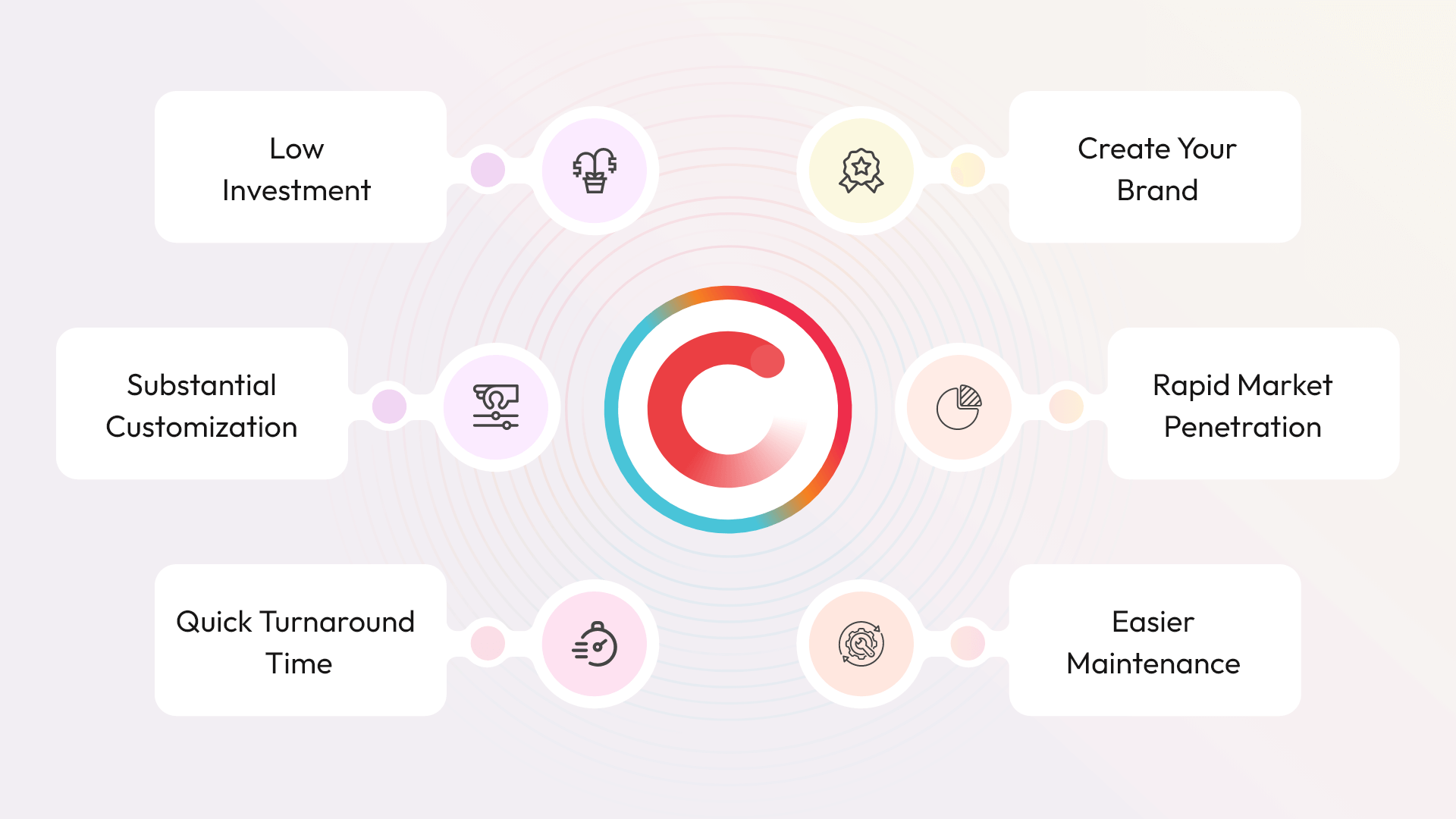
  1. Low Investment- The white label apps are ready-made solutions, which don’t require any initial expenditure. It is very convenient and beneficial for a number of start-up businesses with a limited budget. The market-ready apps do not require the heavy expenses as well that are required to build the highly customized single-owner app.
  1. Substantial Customization- The white label apps can be customized to an extend to infuse the client’s/buyer’s brand image. It is quite beneficial for the client to sync a product or service with their website or social media platforms.
  1. Quick Turnaround Time- For any business, time is a very sensitive factor. Thus, choosing a ready-made solution helps to save precious time and swiftly acquire the market. Likewise, in a market where no such business idea exists, for that also the white label application can turn out to be an instant solution and helps to make rapid profits.
  1. Easier Maintenance- Being in association with an app development company, makes it easier for businesses to have the right and apt post-release maintenance support. It is so because, the one who develops the project knows all the details and glitches about it, therefore, it becomes easier for them to handle any issues and assist their client in the best possible manner.
  1. Rapid Market Penetration- Making into the market at the right time and without wasting your precious time is the key for any business to build a brand identity in the market. All this becomes possible and quite easier by adopting the white label app, rather than waiting for a custom app development and investing a hefty amount.
  1. Create Your Brand- It is an easy and effective method to build your own brand and enhance brand visibility at the same time. The white label app solutions are the best for startups to make their bright presence in the competitive business environment.

How are White Label Apps Developed?

A White Label App Development undergoes three different stages as described below;

1. Development Stage

A development company or a white label app development company usually develop a fully functional app while considering the target audience and the industry-specific goals.

The mobile app is the generalized version that deals with the majority of the operations or we can say, the app is equipped with all the basic functionalities that a number of businesses follow under a specific industry.

2. Rebranding Stage

Owning a white label application, for a development company it becomes quite easy and convenient to sell the app to multiple businesses that are serving in the same industry.

To make this possible, the development company ensures to infuse the business identity in the application by updating it with business-specific products, slogans, logo, and other details.

In this way, the pre-existed app is rebranded by the development company to make it a customized solution for the business or their client.

3. Acquisition of Rights

The company or business that generates the request for a solution or is likely to acquire ready-made software to automate their business, requires to own the rights, and gain control of the app.

The businesses can purchase full-time access to the application with the existing functionalities or can go with cloud apps and use the app based on the subscription period.

Cost of Owning A White Label App Solution

The cost of owning a white label app cannot be fixed, as every project is different and follows variable features and functionalities, which influences the development cost to a great extent.

However, based on the business requirements or the existing white label solution the price of the app can be estimated with the help of a professional developer.

Additionally, the one-time app set-up fee may also be charged as per the companies’ norms, which could be about $2000 or more based on the custom requirements of the business.

Apart from that, the development company also charges a maintenance fee. It also includes an account manager, dedicated load balancers, and more. The charges vary based on the support and setup required by the customer.

Conclusion

In the digital world, mobile apps are considered the best and most convenient way for a business to grow and achieve its expectations. Owning a white label application is turning out to be the most suitable option to instantly extend the business reach without any research hassles and recruitment efforts to raise the operations.

Codiant is a white label app development company that helps businesses with customizable market ready apps for industry sectors like food & grocery, taxi apps, telemedicine app, on-demand counselling app, and more. Our cross-industry white label solution have historically turned the buyer’s business into a profitable one.

For further details, you can connect with our experts to gain knowledge about the existing market ready products and how the solution can be the apt solution for your business operations.

How To Write A Mobile App Product Requirements Document

A well-defined product requirement document is the essence of a traditional project management team to deliver a successful digital solution. Interestingly, almost 70% of the projects face failure due to negligence in preparing the precise software requirement specifications document. Considering this figure, without a doubt we can deduce that the successful deployment of any project begins with a well-planned product requirements document.

Hence, to develop a successful and compelling project, understanding the project’s requirements is the key. And being an entrepreneur, possessing the knowledge of how a mobile app product requirement document can be prepared will give you a big picture of your project.

This blog will introduce you to the PRD concept and further details about it, such as types, processes, characteristics, and other details to draft an impactful outline for your mobile app development or web development.

What is a Product Requirements Document?

A Project Requirement Document is a compilation of the proposed project’s purpose, specifications, features, functionalities and behaviour of the working project. The document covers all the different aspects of the digital project from the initial phase to deployment.

In simple words, a PRD defines ‘how you are going to build the project’ and ‘what you are going to build’.

The PRD can be referred to at any stage of mobile app development. This document can also be used to represent it to the stakeholders and investors while demonstrating the detailing of your proposed project, it includes an Android and iOS app or a website.

It is a detailed blueprint, which guides all the departments involved in building the project to maintain the project stability and get the desired end product. All these details mentioned in the software product requirements document helps to ensure that no blind spot is left.

Why a Mobile App Product Requirement Document is Needed?

Every software or project development is carried out to propose a solution to a problem. But, concluding at a solution and framing the problem in the right manner is the key aspect that needs to be comprehended before moving ahead.

Though these queries can be answered easily when you follow to frame the accurate answer for the 4 W’s, i.e. What, Why, Who and When. To answer all these questions the PRD document is prepared, which provides detailed information about the product and makes it easily understandable to any individual. Let’s get into further detail.

1. “What” you are building?

This is the first and foremost question that needed to be answered, it will communicate your idea accurately and make it easy for tech and non-tech individuals to understand your project’s vision. Initially, these details will communicate the core functionalities of the product that you are aiming to develop.

Further, the research work is carried out and other team experts are involved in it, then the product details get matured. It includes the introduction of varied micro-services and their dependencies, API integration and other tech details that the project requires.

2. “Why” you are building it?

The question, why you are building a product should always be accompanied with, what are your project development aspects.

A definite and guided answer to this question will let your counterparts and team members have a unique experience, get an additional revenue stream, and identify your project’s goals accurately.

3. “Who” is your target audience?

The target audience of every product varies based on the project idea and solution it is offering to the end-users. Evidently, the common project ideas cover a wider customer base, whereas some exceptional and unusual ideas are only exposed to a niche.

Hence, develop the project while keeping the target audience in the mind, such that the product is usable for them. This will define the success of your proposed project.

4. “When” do you need the project?

To develop a project, preparing a software product requirements document is the critical step to initiate the project development.

Documenting all the specifics and dependencies of the project will help to prepare an efficient product roadmap, and assign modules priority – all these details allow every team member to understand their role and tasks with the timeline. As PRDs also include the tentative launch date of your product.

Collecting all these details is a complicated and time taking process, but the effective and accurate answers to all these questions will help to prepare a detailed PRD. This will enable the development team to organize each phase precisely and build quality and timely end-product.

Types of Product Requirement Documents

1. Business Requirements Document (BRD)

A Business Requirements Document (BRD), is a detailed report that comprises of project’s needs and requirements, the purpose of proposing the idea, what solution you are presenting with it, its features and functionalities, and other details along with the expected project timeline.

However, to define all these requirements, a lot of research work is carried out to map out the overall structure, limitations, and other details of the project, before starting any work on the project. As a result, the BRD infuses clarity, holds attention and removes ambiguity in the project’s requirements.

2. Customer Requirements Document

The Customer Requirements Document is a detailed document that defines what the software or system needs to do while considering the customer/end-user perspective. The document is written in layman’s language, no technical or complicated terms are used to demonstrate the user’s point of view.

Thus, a well-written customer requirement document should be clear, concise yet well explained, and unambiguous. These details help designers and developers to understand your requirements, and can also define the deadline, estimated budget and other details.

3. Software Requirements Document or Software Requirements Specification (SRS)

An SRS is a document prepared for the proposed project, which held project details, such as requirements, expectations, and standards. These details can be arranged in the form of spreadsheets, text documents, schemes and other required elements to present the product’s requirements and vision in a much easy manner.

In simple terms, a Software Requirement Document provides a detailed project description of how a project is visualized to work and how the development team should implement the entire development flow. A good SRS defines consistent details, correct information, a hierarchy of operations, verifiable and modifiable details, etc.

4. Quality Requirements Document

A quality requirements document demonstrates the project’s quality and the capability that must be present in the end product. The quality documents are submitted to the Project Manager to analyze the project’s feasibility and outline the quality control plan prior to project commencement.

A Quality requirements document comprises multiple factors, criteria, and benchmarks that must be fulfilled. It includes consistency, reliability, usability, availability, maintenance, and customer experience. Generally, a Quality Requirements Document is written by a business analyst or a project manager.

5. Technical Requirements Document (TRD)

Software development is a process that follows a systematic approach to transform the required specifications into effective and accurate codes. The TRD report comprises of defined purpose, proposed functionalities, implementation, and operations performed by the features that developers have to manage.

A TRD document provides clarity in project development and structure to handle and manage the problems/operations. Overall, a technical requirements document is no less than an organized flow that proposes a foundation for further processes.

6. Market Requirements Document (MRD)

A Market Requirement Document (MRD) is a document that is written to define overall market opportunities a mobile app product can experience and explore. The document represents the market size, target market and competitors in the local and global markets.

MRD is usually a strategic document that is compiled by the product marketing manager or sometimes the product manager to define all the initial and basic requirements to kick-start the project. The document also defines the revenue opportunities and features list along with categories.

7. Functional Requirements Document (FRD)

A Functional Requirements Document is a formal and written detailing of the mobile app requirements specified to achieve business goals. It is a form of formal contract which ensures the client agreement and keeps the technology team on the same page to make them aware of all the do’s and don’ts.

The major purpose of preparing an FRD is to bridge the gap between the business and technologies – define the requirements and functional solutions directed to the mobile app product development. It is usually prepared by the technical team after going through the BRD and SRS documents.

8. User Interface Requirements Document (UIRD)

A User Interface Requirements Document focuses on preparing and anticipating the prospective audience and target customers might need. The document is prepared after detailed research which ensures that the user interface have elements that are easily accessible, understandable and facilitate suitable actions.

A detailed UIRD makes it easier to build the app or website because it provides a guided and detailed view of the proposed product to developers in a simple and easily understandable language. This helps them to anticipate where the issue or error may arise. The document is prepared by the UI designing team after analyzing the project’s idea and detailed specifics.

What are the Key Points of the Software Product Requirements Document?

1. Goal & Objective

To design a product requirement document for a mobile app, the first and foremost step is to clearly define and identify the goals and objectives. This can only be possible once the development company accurately understands the business idea which will help them to propose an effective set of functions for the expected digital solution.

2. User Personas and Stories

Defining a user persona and hypothetical stories helps to determine how the right audience and target users can engage with the product. Google Analytics can also be used to create user personas. Using all the basic details to analyze the user and the buyers helps to align and market your product/services in order to yield better results.

3. Functional & Non-Functional Requirements

The mobile app development should include a detailed product requirements document (the types of mobile app product requirement documents are explained above). The functional description should be followed by non-functional app requirements, such as app security, device compatibility, performance, multi-language support, etc.

4. Wireframe & Design

In this stage, the design expectation for the mobile app development can be presented in the form of wireframes and mockups. Additionally, further details and specifications can be documented in the User Interface Requirement Document that helps in designing the product by following more creativity and the suggested ideas. The wireframes and mockups work as a blueprint to present where the expected features will fit on the page and other details.

5. Sitemap

The documentation of the sitemap presents the complete list of all the pages or screens that are required for the app/website to run smoothly. Apart from that, these pages are arranged in a sequential manner to demonstrate easy navigation. This arrangement of screens ensures that the screens are linked in such a way as to present a meaningful process.

6. Technical Specifications

The detailed description of the technologies and technical elements that can be used to build the project that best depicts the client’s expectations. Choosing the right tech stack can be the basic building block of an app or web. Some of the popular tech stacks that developers commonly prefer are MEAN (MongoDB, Express.JS, Angular.JS & Node.JS), MERN (MongoDB, Express.JS, React & Node.JS), LAMP (Linux, Apache, MySQL & PHP) and MEVN (MongoDB, Express.JS, Vue.JS & Node.JS).

7. Assumptions, Constraints, and Dependencies

The requirements and expectations of a product’s success are usually put under assumptions. A successful product is defined under multiple factors, it includes expertise and experience in the target market as well as niche market knowledge. The presumption in the mobile app product requirement document assembling comprises assumptions about the user, business, and technical resources.


Ways to Develop and Manage Product Requirements

Here are some of the ways that can guide you to effectively develop and manage mobile app product requirements;

1. Implement Usage of Requirement Management Tools

To deliver a project within or before the assigned deadline, it is suggested to implement the usage of requirement management tools and collaborative project management software. These tools can help your business to store and share valuable details that must be needed for developing and managing the mobile app product requirements document.

2. Define A Process for Requirement Changes

A project development process normally undergoes requirement changes or unexpected requirement changes. To handle and cope with such planned or unplanned changes in the project – defining the mutually deduced developing steps to implement required changes could be an intelligent call. It will help to eliminate any last-minute mismanagement and panic mode in the team.

3. Implement a Risk Analysis

Being an intelligent team, you can predict, plan and be ready to deal with any unforeseen situation or any potential issue. All this can be handled and planned in advance by implementing a risk analysis study and defining a possible measure that can be instantly followed by the assigned team members if such issues arise.


Characteristics of a Quality Mobile App Product Requirements Document

A mobile app product requirements document can turn out to be an incredibly effective tool if it possesses specific features and qualities, as mentioned below. The mobile app scope document can be a very helpful and guiding tool for all the team members, thus it should be designed very intelligently and in a well-researched form.

  1. Specific Qualities- The project’s requirements need to be outlined before getting into the project design & development phase. Aim to extract details from clients which depict their purpose, projects goal and other details or qualities. However, keep it simple and crisp, so that the concerned person can get the overview and required information on the respective issue.
  1. Complete- Ensure to provide well-organized and quite detailed information about each functional specification for developers. It will help them to learn details and implement specifics accurately. In contrast to that, if you are not having enough details about any element, then mark it as ‘TBD’ (to be determined) and take follow up periodically.
  1. Feasible- The PRD must be designed after analyzing the project’s requirements and platforms (Android, iOS or hybrid), along with the existing team’s efficiency, capability, time and budget. Such detailed study, helps organizations to analyze their team and the target, such that it is attainable and useful in achieving their goals.
  1. Prioritize- Setting the hierarchy of each element, functionality and module is very important and much needed for the development team to plan their task, as well as the client too to get the basic working version of the project in a minimum set timeline. The ranking of all the functional and user requirements operations will fasten and align the development approach.
  1. Unambiguous- The mobile app scope document in the initial phase is prepared to avoid miscommunication and confusion at the last moment. Therefore, it is highly recommended to document every requirement, so that in the end, both expected and delivered results match each other.

Conclusion

The sole agenda of preparing a mobile app product requirements document is to present a guided track to develop a quality and successful product. Thus, ensure to mention all the requirements of your business, including functional and non-functional requirements, technical dependencies, assumptions and restrictions as well. It will maintain a record of every operation, decision, change/update and client’s expectations.

The PRDs can be an easy and convenient way to introduce updates and suggestions that enable team members to easily understand the requirements and work over them parallelly with the ongoing development process..

So, if you are aiming for mobile app development but experiencing a hard time preparing a well-defined PRD to interact with your development team, reach out to us, and we will gladly assist you with your issues.

How to Build An App Like Clubhouse- An Audio Social Network App

Think Social Conversations. Think Clubhouse.

The Clubhouse has exploded onto social media and cornered the market with its excessive popular concept of live audio.

With the user base ranging from musicians, creators, authors, entrepreneurs, parents, sports fans, stock traders, comedians, and more… the app has effortlessly picked the interest of users from all niches and backgrounds.

Apparently, while the app was performing exceptionally well to entice users but the pandemic has been the major catalyst to spark its growth when people were stuck at home and were finding ways to share their emotions confidently.

The launch of Clubhouse has resolved this problem and swept a good number of audiences. Entrepreneurs can invest and strategize in this innovative idea by integrating a robust list of features to attain success.

The Clubhouse is an invite-only only voice-chat app that has covered a huge audience and succeeded in offering a wonderful user experience.

Are you excited to know the history of the Clubhouse app?

Scroll down the article to get detailed information about Clubhouse, its working process, the reasons behind its immense popularity, and the comprehensive stepwise process of developing an app like a clubhouse.

Read on!

What Is Clubhouse?

Clubhouse is an audio-based social networking app that is specially designed to help people carry group conversations easily on the topics of their interest. It allows people to create separate rooms so that speaker can take the lead as a room owner and audience can listen to it. The room owner can also allow other people to join in as a speaker.

The app promotes the significance of human interaction particularly when they are miles apart. In short, it is an audio-based app to connect with others in real-time by talking, listening, and learning from each other.

Why Clubhouse App Is Going Viral and Hailed as The Investor’s First Choice?

Clubhouse-App-Is-Going-Viral-codiant

The hottest and latest audio-based social platform is driving people of all age crazy and making them frenzy. Fuelled by influencers to celebrities, the app has a dash of exclusivity that is attracting investors globally to blow billions of dollars and register users online.

The reasons behind the popularity of an app like Clubhouse are worth considering. With its unique and alluring features, the app development succeeded in taking a huge market share. Here are the features of attraction that is increasing the network of users and their acquaintances.

  • The invite-only app ensures user authentication and verification making it a secured space to share the voice.
  • The audio room option is where users can participate, invite their friends, or leave the room anytime.
  • Allow users to listen or share their audio on different topics inside the rooms created.
  • An interactive audio-only app removes the obligation of facing camera and come forth to share their voices.
  • An interactive platform to create a network and connect with a large audience easily with specific user interest.
  • It allows you to work at ease and convenience, further extending the platform’s popularity.

Apart from this, the other technical expertise that contributed to the app’s popularity are easy personal optimization, simple navigation and user interface, the TikTok like nature that picks users’ interests and create a highly interactive environment.

Clubhouse-facts-codiant

How To Develop An App Like Clubhouse?

Building an app like Clubhouse involves a few simple step procedures that need to be followed. Let’s check the below-mentioned points to make your idea work:

Carry Out the Market Research To Find Market Fit Product

Every successful idea is an outcome of the initial research that provides confidence to an individual to move ahead. So, before you jump into the development phase of the clubhouse like the app, it is necessary to check the viability of your product. Make sure to understand and identify the target audience, check the nearby demographics and check current related trends.

Also, while checking the external environment factors, it is crucial to analyze your value proposition and the potential of your product to satisfy the market demands.

Select the Specialist Development Team

The team acts as a backbone in the process of turning up your idea into reality. Conduct in-depth market research to find the best UX designers & experienced team of developers who can thoroughly understand your idea and put down the necessary efforts to make it a great success.

Also, don’t forget to create a systematic workflow that can act as an initial roadmap for the team to move ahead. Once you are done with your team selection, consider discussing the feature list you want to include in your app to make it unique from your competitors.

Build an MVP Version of The App

MVP refers to the Minimum Viable Product in which the minimum number of features and functionalities are used to develop a testing app version at a low cost and given timeframe. Creating an MVP version is crucial to understand the performance of the app and getting genuine feedback from the first adopters.

But make sure to offer the value to the prospects with minimum features to open the doors of its success further. With a good MVP, design mockups, and prototype, one can easily attract new prospects and turn them into regular users. Also, it can be a key to raise the required funds for the project development.

Top Features to Include in Clubhouse App Development

Some of the common and not-so-common features included in the Clubhouse app are as follows;

  • Profile- The user can create their profile and update details that they like to share or show to fellow app users. User can also link their other social platforms links to reach people through multiple sources.
  • Invites- Existing users can invite outsiders to connect through the app by sharing the unique invite reference link.
  • Language Filters- The app is all about verbal communication, therefore to facilitate users the company has introduced a filtering function, where users can choose rooms in the language they understand.
  • Customizable Notification- Notifications are for increasing user engagement with the app, but sometimes it may turn annoying for the user. Therefore, the user can customize the notification based on their convenience.
  • File Sharing- Users can share images and documents of a reasonable size limit with other users with ease.
  • Private Rooms- In Clubhouse, the users can even avail of the feature of a private room, where the user can interact with a person after getting the invitation accepted.
  • Clips- The live listeners can snip the recent or ongoing rooms’ 30-second audio and share it anywhere with a link to invite people to join the room. However, the host can even turn off this feature for other members.
  • Replay- This feature allows the creator to record the audio of the room and save it to their profile and club. They can even download the audio and share it on other platforms, like a podcast. The host can even set the recording permission for other members too.
  • End-to-End Encryption- In the Clubhouse, the user is getting end-to-end encryption, where the data and audio communications are highly secure and stored in an encrypted form.
  • Audio Quality- Clubhouse is all about voice conversation. Thus, considering the importance of audio, the user can switch the audio quality from High to Standard or vice-versa.
  • Search People in a Room- The user can easily search for a specific person in the room when the participant list is long.
  • Hiding a Room- The user can hide the rooms if they don’t want to see or visit anymore. Other users who search for it, will get the result of irrelevant room names.
  • Hand Raise- To maintain the flow and interaction in the chat room, the organizer can manage the queue by using the hands raised feature by the participants.
  • Name Change- Clubhouse allows the flexibility to its user to change or correct their names, in case they created the account with an alias or fake name. But can do so only once in their lifetime with the app.
  • Social Media Integration- The user can link their other social media account to the app. It is a great feature for businesses and public figures to connect with people and build their brand on multiple platform channels, such as Instagram, Facebook and Twitter.

Focus on Working for A Killer Marketing and Sales Strategy

Nobody will know the power of the sword unless it is being displayed on the battlefield and the same theory applies to your product. Thus, to demonstrate the utility of your product, it is essential to plan a robust marketing and sales strategy that explains the value of a product to the target audience. You can play around with these concepts to perform your best performance:

  • Concentrate on building your brand identity
  • Target to create an efficient online presence
  • Set up an effective sales funnel
  • Set up suitable sales tools
  • Decide the achievable sales goals

Carry Out the Data Analysis

Data collection is an integral part of the performance analysis which is necessary to take further decisions and understand the market demands. Make use of the modern and dynamic data analytics toolkit that can help in making good strides. After that, consider linking your data to a business context in order to take the well-intentioned decisions that lay down the path to achieve the pre-desired business goals.

Technologies Required to Build Clubhouse Like App

The required tech stack is required to bring success to your project:

Languages and Frameworks: Python, Java, HTML5, Kotlin, CSS3, Objective-C, Linux, Kotlin, Django.

Design: Figma, Google fonts

Application Hosting: Nginx, AWS, PubNub

Application Utilities:  Airtable

Analytics: Facebook Pixel, Google Analytics, Google Tag Manager, Amplitude

Back Office: Lever

Collaboration:  Google Workspace

Data Stores: Redis, PostgreSQL

Marketing and Sales Tools:  Ghost, Google Ads, Salesforce, Zendesk, Facebook Ads.

How does Clubhouse Make Money?

Developing any social media platform is super easy but making money out of it is really a difficult task to perform. There are many processes that can be applied in the apps to make money out of it:

Subscription Method

This is a very popular model which allows developers to create a free download app and the users can buy subscriptions that provide them access to explore more content of their interest. Using this strategy, the app owner can easily create the initial user base and manage to attract more users and turn them into paid ones.

In-App Advertisement

This is another popular method used in the market. The method allows the app owner to provide space for the in-app advertisements and charge a fixed amount from them. Also, the strategy offers better benefits if in case the app is able to deliver useful content to the audience. Nobody likes disturbances in between thus users switch to the ad-free version by paying a fixed amount. Thus, in both cases, there are good chances of generating revenue from the app.

Tipping

The content creators in any app are the soul of that platform and offering a virtual tip for their hard efforts is necessary to maintain their motivation. The app allows the audience to directly support them by purchasing a ticket for the content or paying a certain amount as a tip. Thus, this method helps in creating a huge user base and attracts existing and new content creators to provide innovative content for the success of the app.

Partnerships

This model is usually suitable for the app platform which has a huge market user base in any particular niche/area. The app owner can choose to connect/partner with other well-known brands that can help in generating a good amount of revenue and a strong brand image. Also, a mindful partnership will benefit the user with exposure to the new demographics of the partnered app.

Cost of Developing an App Like Clubhouse

Deciding the cost of developing an app like Clubhouse can vary because it depends on multiple factors included in the app. The factors that accounts for total cost are features, design, product complexity, time frame, and more.

Let’s discuss in detail about how these factors are going to affect the cost estimation of the app development.

Research & Design Phase

The app development begins with the discovery process where the discussion will move around the data collection, understanding of product needs, and deciding features to be included. This may vary as per the individual client requirements and affect the necessity of resources and thus ultimately bring variations in the cost.

Development Phase

After deciding on the basic features and functionalities, it is necessary to decide on the relevant tools and technologies to be included in the app. Apart from this, there are other technical fields that need to be considered like types of databases, APIs, SDKs, and more. Depending on the decided technical factors, the cost of development will vary for each individual. The more complex tools and technologies, the higher will be the cost and vice-versa.

Testing and Launch Phase

Testing is one of the crucial phases before launching the product on the market. The testing duration and tools requirements are depended on the complexity of the app. If the app is complex with diverse features and functionalities then it will take some more time to finish the testing and vice-versa. Once the testing is done, the app is ready for launch. While the version of the app launch will again bring fluctuations in the app development cost.

Technical Documentation Phase

Lastly, the documentation phase is performed to keep the record of important information about the project. The cost will vary according to the length of the documentation and the complexity involved. It is obvious that lengthy documents will require more manpower and resources and it will cost higher and vice-versa.

Moreover, the estimated cost of developing an app like Clubhouse will cost around $30,000-$40,000.

To get detailed information about your custom app development cost, contact our business development managers.

Steps To Choose The Development Team

The development team is decided based on the type of project you are working on. If you are trying to launch a startup project with fewer features and functionalities then it may require a small team to work on. Whereas, a project with dynamic functionalities will require a well-experienced and huge team to make your project a great success.

To decide which team will be suitable for your business, here are three major categories you can choose from:

1. Outsource A Team

Outsourcing a team for the app development means, handing over the task to an outside agency that can understand the project needs and perform really well for the company. This is a contractual agreement where the outside agency builds the effective project as per the expectations of the company.

Here are the few benefits that an outsourcing agency offers:

  • Offers access to the large talented individuals
  • Provides an opportunity to lower the cost
  • One can easily find a technology proficient team as per their convenience and project requirements

2. Build An In-House Team

While building an in-house team you can hire developers from scratch and fulfil your project needs. Remember that you need to go through the whole recruiting process from recruiting, and interviewing to employee onboarding which will be a time-consuming process.

Here is the list of benefits you can enjoy by hiring an in-house team for your project development:

  • You can establish a robust team as per your work culture
  • You can manage good direct communication with an in-house team
  • You will get immediate support in case of any future bug fixing or another emergency

3. Hire Individual Freelancers

Freelance developers are individuals who are not working for a company but individually work for the projects on an hourly basis. They hold a good experience in dynamic industries and thus they can easily fulfil the project needs.

Sharing down the list of benefits earned by hiring Freelance developers:

  • You can get access to the developer’s talent globally
  • Freelancers offer the flexibility of immediate support in the project development
  • You can save a lot of money because you only pay for the hours worked by freelancers

An Ideal Team Size Required to Make an App Like Clubhouse

  • 1 Project Manager
  • 1 UI/UX Designer
  • 1–2 iOS Developers
  • 1-2 Android Developers
  • 1 Backend Developer
  • 1 Quality Assurance Specialist

Summing Up!

Just like other social media apps, the trend of audio-based apps is soaring in the market and the pandemic situation has added much significance to it. Like never before, people are enjoying the audio chats and finding it convenient to use the concept of connecting without even turning on the video.

The app platform is helping to build the confidence to share their emotions with better clarity. But just developing an audio-based app will be no more than other existing apps that are struggling to gain traction in the market.

So, just to build a strong brand image and satisfy emerging market demands, it is crucial to try an innovative approach. Include a list of unique features that can be appealing to the users and can offer customer satisfaction.

Begin the journey to build this trending audio-based app and turn this robust idea into reality. Connect with the expert team of developers at Codiant who have mastered the art of developing feature-rich mobile apps in various domains. Developing the next popular voice-chat app is just a click away. Discuss your project now.

A Step-by-Step UX Design Process

Whether you got a project to develop a website, a mobile app, or any other digital solution, the most common question UX designers often encounter is “What process do you follow when designing apps and websites?”.

For a UX designer, understanding the UX process is the foundation of UX design. However, UX design patterns used to evolve periodically, which compels designers to stay updated with recent updates and trends to serve the target audience accurately.

Having a well-planned and appealing design process promotes the chances of building good UX design with an amazing user experience. Planning to build a career in UX design is quite challenging, fast-paced, and requires a diverse skillset. And to get into and sustaining in this field, requires a lot of learning and logical thinking.

In this blog post, we are going to explore a systematic, iterative UX design process that will help you design an exciting and simple user interface with improved usability, accessibility, and customer satisfaction.

Before that let’s understand what is a UX design process.

What is a UX Design Process?

A UX design process is an iterative step-by-step methodology UX teams use to create projects that provide meaningful experiences to the users. A UX design process enables designers to meet project standards, test, and iterate on several ideas to propose the best solution while identifying hidden risks and opportunities.

UX design is designed with the agenda to deliver a solution that addresses pain points and needs of the users. Apart from making the product usable, UX designers also pay attention to aspects such as pleasure, ease, efficiency, and fun while designing a user experience.

The UX process follows the same design thinking process of five stages i.e. Empathize, Define, Ideate, Prototype, and Test.

Stages of UX Design Process

The stages of a UX design process rely on the type of product the designer is working on. Different types of projects require a slightly different approach and concept to design under the standard industry norms. For instance, a corporate website designing approach and a dating app designing approach will differ from each other.

Considering the generalized design thinking concept the UX design process can be divided into 5 stages, namely;

MicrosoftTeams-image

1. Product Definition

It is the initial and quite crucial stage to identify the product requirements and is carried out prior to building anything. Understanding the context and existence of any idea is the initial priority of any UX designer. It is the crucial stage where the foundation of the final product is derived.

Under the product definition, the UX designers take the inputs from the client and then do a lot of brainstorming to understand the project requirements, competitive market, latest market trends, etc.

The product definition phase also includes the following steps:

  • Interviewing Stakeholders to gather valuable insights on the project and precisely identify business goals.
  • Value Proposition Canvas of the product to identify varied aspects of the project, such as what the project is, who are its users or target market, and what they will use it.

Understanding all these specifics helps the designing team and the client to gain an understanding of the product and how to infuse all the specifics so that it reflects exactly the same to the user and fulfills business needs.

  • Concept Sketching is the low-fidelity mock-up of the proposed product to identify the basic structure of the project the client is planning or requires.

While you will carry out defining products and have a clear overview of the project you have to start doing documentation. It should cover the features list, technical limitations, and style direction.

Some of the common questions you can work on are:

  • Describe the company, product, and the problem it aims to solve.
  • Who are its competitors, value proposition, unique differentiation, and target audience?
  • What kind of project methodology you will use? Agile (scrum), waterfall?
  • What kind of brand image should be coming out? Corporate, Friendly, Playful, etc.

Tools like Miro, Asana, Jira, etc. can help you to customize your workflow and collaborate seamlessly.

2. Product Research

Once the UX designers have a grasp on the idea of the product, now it’s time to get into the research phase. Research work supports having a clear idea about the project and the ongoing market trends.

This research work includes both market and user research which helps to identify new ideas and create the most feasible solutions by taking informed decisions.

A well-planned research work yields the most appropriate design and gets instant approval, which ultimately saves a lot of time and money. However, the research work can be a time taking process or less. To get the precise UX design the research work should be focused on the project’s complexity, available resources, time duration for the designing work, and other influential factors.

The product research phase can include the following process as well.

  • In-depth Interviews are the most common qualitative research methods that can allow fetching crucial and valuable details from the client about the project ideas needs, wants, fears, behavior, motivation, and the target audience too. All these details provide a good understanding of the user which supports UX designers to build a great product experience.

These in-depth interviews are held during the Discovery phase of the product research human-centered design process. The logistics needed to plan interviews are recruiting, scheduling, format, duration, note taking, and interview protocol.

  • Competitive Research enables UX designers to learn about the latest ongoing industry trends and identify market opportunities for the proposed product in their niche. You can also carry out surveys to your target audience with guided and specific questions.

To go more in detail, the competitive analysis can be carried out in five simple steps:

MicrosoftTeams-image-451665753043

3. User Analysis

In this stage, it’s time to utilize all the gathered information from the previous two stages to analyze and filter out the important elements or details, like what users require, why they require these specific elements. The analysis phase of the UX design process includes;

  • User Persona is the presentation of the standard user profile that represents the types of users and various elements of the product. While designing the final version of the product, such references could come to be handy as a realistic representation of the target audience.
  • Building User Stories helps designers to analyze or define the flow of the customer’s interaction with the proposed product or service.
  • Empathy Map will help you draw the ‘why’ behind user needs and wants. This way you will gain a magnified view of users’ world and the problem they face which eventually can be turned out as a product opportunity.
  • Scenario & Storyboarding presents the user’s story in a visual way. It allows UX designers to interlink user persona and user stories to streamline the flow of the interaction with the product/services. Here’s a job story format that can help you define a problem.

MicrosoftTeams-image-1

4. Information Architecture

Now you can start planning the structure of a product i.e. website or mobile app. The information architecture will help you create navigations, hierarchies, and categorizations. While designing the information architecture UX designers should pay attention to the following key elements:

  • Gestalt principles: It will help you decide how to present and organize the information on a page.
  • Mental Models: IA practitioners can figure out what users assume before interacting with a product and design accordingly.
  • Cognitive Load: The less brainpower a user has to put in while interacting with the product the better the UX. So, keep the amount of information as less as possible.

5. Design

After data collection and analysis, and having a clear picture of the proposed product/service, it’s time for UX designers to practically enter into the design phase. In this phase, the designers have to focus on multiple designing aspects, ranging from Information Architecture (IA) to the final version of the UI design.

Building an appealing and effective design with a highly collaborative design follows multiple iterations to reach the perfect point. The design phase in the UX design process includes the following elements.

  • Paper Prototyping or sketching is the most convenient, easiest, and quickest way to visualize the proposed idea in the brainstorming session. It is a hand-drawn project concept on paper or on any convenient digital tool.

Sketching is a very effective strategy that simply explains complex interactions. It helps to design multiple quick options of solutions and later decide on the most suitable option.

During paper prototyping, designers should avoid using dummy text and instead use real content.

  • Making Wireframes from the chosen sketches helps designers to prepare a basic version or structure of the app/website by including the key elements and arranging them accurately. These wireframes are preferred in further designing steps to design mock-ups and prototypes.
  • Designing Prototype is the final version of the web/app design. These prototypes are the advanced and interactive versions of the wireframes i.e. low-fidelity prototypes, whereas these advanced versions of prototypes are often termed high-fidelity prototypes.
  • Design Handoff is the end of the prototyping phase where the design is handed off to the developer. For this, you need to create a design specification by integrating all the visual design assets that are required in development such as colors, characters, styles, measurements and information such as flows, behaviors, and functionality to develop a working project based on the final prototypes’ version.

MicrosoftTeams-image-2

6. Testing & Validation

Validation/testing is the final step involved in building the user experience that involves evaluation and benchmarking the usability of the final product with real users. The validation phase in the designing process is implemented once the high-fidelity prototype is prepared. In the user testing phase, the validation process of the product is carried out by both end-users and stakeholders.

The validation phase in the UX design process can include the following activities:

  • Launch or In-house Testing can be carried out once the product design has been finalized with its usability. The team members should frequently use the platform and perform varied operations to identify issues or major usability flaws.
  • Testing Sessions with end-users or target audiences can be performed. Different types of testing can be implemented, such as usability testing (moderate to semi-moderate), beta testing, and A/B testing.
  • Surveys are a brilliant mode for capturing user responses in terms of quantitative and qualitative details. In surveys, the UX designers can add direct questions to seek a clear response from the users on specific features.
  • Analytics tools can be very convenient to deal with quantitative data and deduce valuable insights based on the user experience with the product.

Wrapping Up!

As we learned earlier, the UX design process couldn’t get fit into a defined solution due to varied industries and the demand for solutions. Despite that, whatever process you follow it always aims for the same goal i.e. building a world-class solution for your user.

To make all this possible, being an entrepreneur, one requires expert designers/teams or a UX designing company that can deliver the required solution.

If you are also looking for well-versed UX designers that can deliver your business specifics, then UI/UX team at Codiant can be the one-stop solution for you.

We are having a fine team of UI designers, and UX architects, and we are recognized as one of the top UI/UX development companies that cater to specific business requirements and organizational goals.

How to Choose A Trustworthy Cloud Service Provider?

In the breakneck world, cloud service providers have eliminated the need for hardware to operate any website or application.

There are a number of small to large scale businesses that are moving to cloud services. The businesses have very well analyzed the ability of cloud platforms, its benefits, and adopted it with open arms.

In a period of decade, cloud computing services have lured the attention of the whole tech market for the sake of remote data access and multi-user facilities.

As a matter of fact, the demand and requirements of each business is different and each business is unique in its own self, so not all solution providers can adjust into a same size frame.

As a tech company, we very well understand all these concerns and always do our best to help our clients in resolving such issues. That said, if you feel stuck somewhere over making the decision to choose a suitable and trustworthy cloud service provider, then you can find most of your answers here.

We have distilled the key factors that can help you to understand your business needs and choose the right cloud service provider accordingly. Let’s delve into it.

What is Cloud Computing?

How to Choose A Trustworthy Cloud Service Provider1665050384

Cloud Computing is an on-demand service that enables devices of clients to access data and cloud applications with the help of internet service from remote physical servers and databases.

In cloud computing, companies don’t have to build their database server, rather they can simply purchase a storage space on cloud and save all the details over there. Then the user can access the relevant data at any time of the day. The internet connection links the front-end (browser, client device, network and cloud software applications) to back-end (database, server, and computers). The centralized server only communicates with the front-end and back-end devices. Typically, each application or workload has a dedicated server.

Cloud Computing is usually preferred among businesses and individual users due to a number of reasons, it includes minimum hardware and software expenses, increases productivity, performance, high data security, and quick and efficient.

What is a Cloud Service?

The term ‘cloud service’ stands for the delivery of wide range of on-demand services to companies and customer with the support of internet service. The services can also be used for professional services that support the selection, deployment, and continuous management of different cloud-based resources.

Cloud services can be properly managed by cloud computing service providers and vendors. Customers can access the data from servers, so the companies don’t require to host the application in its on-premises servers.

The cloud service is designed to deliver easy, quick, and affordable access to data or applications without requiring any personal infrastructure or hardware.

For instance, checking email to access any document, people or employees prefer cloud services to access data instantly and at any location with internet connectivity.

What is a Cloud Service Provider?

A Cloud Service Provider is a third-party company or an agency that offers components of cloud computing i.e. infrastructure, cloud-based platforms, and storage to its clients. Cloud Services allows its clients to only pay for what they need/use.

There are 3 types of Cloud Service Providers, it includes IaaS (Infrastructure as a Service), SaaS (Software as a Service), and PaaS (Platform as a Service).

cloud_computing_service_delivery_models_1000x6001665050411

  1. Infrastructure as a Service (IaaS)IaaS is the origin of cloud computing, where the infrastructure components are delivered that exist in on-premises data center. The web services comprise of database, personal digital servers, storage, and additional on-demand services. The user is charged on the basis of storage space used.
  1. Software as a Service (SaaS)SaaS providers offer a diverse range of business technologies, like CRM (Customer Relationship Management) software, HRM (Human Resource Management) software, Data Management Software, Productivity suite, all such services that a vendor can host and provide through the internet. SaaS is the cheapest way to migrate to cloud, and it requires third party support to customize and implement services as the size of the business.
  1. Platform as a Service (PaaS)PaaS offers cloud infrastructure and services for users to access and perform relevant functions. It is commonly preferred in the software development process. Under this service, the clouds are centralized on a network, and don’t hold any control over its infrastructure.

How to Choose A Trustworthy Cloud Service Provider?

  1. Cloud SecurityData is the lifeline of any business, so data security remains the major concern for any business. For that, businesses usually implement plenty of security measures to preserve their customers’ valuable data and applications. To get all such services at a place cloud service is the most suitable option.The user doesn’t have to pay any additional charges to define the level of security they require for their business. It is like a shared responsibility between the customer and the cloud service provider. The high-level security authentication access is applied to filter the traffic and configure the accurate needs of the business. All these authentication rules can be configured and managed centrally, which minimizes the overhead cost and allow IT teams to focus on other business areas.
  1. Cloud ComplianceResearch thoroughly while selecting cloud service providers that support you to meet compliance standards that are applicable in respective business industries. Every industry has different norms and regulatory compliance, such as HIPAA, GDPR, or ISO.Each regulation has different requirements, breach response, and reporting. So, analyze where your responsibilities lie, and check off the compliance aspects with the service provider. As a matter of fact, some industrial regulation forbade to store, process, or transfer the customer data to cloud platforms whose data storage ability is confined under geographical boundaries or have some specific requirements for data protection, access authority, or data confidentiality.
  1. Contracts and SLAsBefore finalizing the cloud architecture provider carefully review the contracts and SLAs, if required go for amendments as well. It can build a transparent and healthy contractual relationship between the customer/client and the cloud service provider.Therefore, a guided and focused approach should be attempted over legal requirements for the hosted data security, especially under GDPR regulation. In addition to that, make sure the SLA includes the exit or penalty clause, if assured services are in vain or not delivered.
  1. ArchitectureCloud Computing Architecture is a combination of multiple components that are required to provide Cloud Computing Services. The different components include a front-end platform, a back-end platform, internet connection, and a cloud-based service delivery. The front-end of cloud-computing consists of clients’ part, whereas the back-end part consists of a database server or cloud itself. A database server or cloud comprises of virtual machines, security mechanism, data storage, servers, etc.So, while selecting the cloud service provider, analyze how their cloud architecture can go with your business workflow, while considering businesses ongoing and future perspective both. For instance, an organization has already invested a lot in Microsoft tools then, can go with Microsoft Azure. It will streamline your business process and workflow.
  1. CostCost is one of the major concerns for any business decision making to choose a cloud service provider. Initially, you can go with a pay-as-use option where you can find multiple storage options, with discounts and offers occasionally.In contrast to this, a low-cost cloud service offering might be tempting to grab your attention, but you do not always get what you see. So, choose wisely and verify every detail, if needed go for bargaining or ask for some special discounts and offers.

    Generally, you can get to explore three different ways to purchase on cloud service platform, which are as follows;

    • Pay-as-you-Go: Pay the amount for the size of data storage space used, no upfront cost to pay.
    • Reserved: Purchase and reserve a definite size of storage space for a period of year (whatever time duration suits you), with an upfront cost based on storage space.
    • Volume Discounts: Acquire multiple services from the same service provider as your company grows, and as a result you can relish additional discounts for specific services.
  1. Technologies and SupportThe suitable cloud platform should work in a streamlined manner with your business standards, architecture, and services to align workload, management, and technical environment.While shifting from traditional server to the cloud platform, data migration is the most complicated aspect and for that businesses require expert assistance.

    Examine if the cloud service provider extends proper support and technicalities to smooth the data migration process. Most of the cloud service providers have tool assessment to help in migration that support server, database, or application migration.

  1. Backup and Disaster RecoveryCloud Service Platforms can also be used as an alternate backup plan to keep their data safe from any type of disaster, natural calamity, power failure, etc. Like this, the organizations can keep their data safe from unforeseen natural and unnatural threats.The cloud services also keep the backup of your data, to be doubly-assure. In that reference, analyze how frequently the cloud service provider takes the data backup. As there is no point in being associated with such a service provider that is not at least backing up the data once a day. There are service providers that keep the backup of data for 45 days, and can extend the duration if a request is raised.
  1. ReliabilityStudy and analyze the past performances of the cloud service providers during the past few years to measure their reliability. Check out the points from where the service provider can handle both planned and unplanned downtime.It could be a crucial aspect to get into the depth to check to what extent the data recovery and data backup can be possible during the unplanned situations.

    Well, you can’t expect perfection, as downtime is inevitable and every cloud provider faces such circumstances at some point. But what matters the most is how the service provider tackles such situations or how much preparation/preventive measures have been taken in advance.

Conclusion

Choosing a right and trustworthy Cloud Service Provider is not a choice, rather it is a necessity for any business. Businesses always seek highly secured, round-the-clock support with quick resolution as a cloud service provider but at an affordable rate.

In all such aspects, Codiant can guide you accurately in the process of cloud service selection, which can appropriately serve all your business requirements.

We have a team of cloud solution providers and data migration, that can understand your business workflow and monitor the data migration to cloud with utter precision.

In addition to that, you can also reach out to our expert business associates, who can help you to design a solution to enhance your data security, scalability, flexibility, and all in a cost-effective way.